Public beta
NEW v0.9.80 · 24 Oct 2026 — Public beta — Qobuz, HIGHRESAUDIO, ALAC and AAC tracks name their real codec – and network speakers show their format. →
The audiophile streamer Now playing

Audiogravity

Audiogravity is a streamer. A conductor, not a soloist.

MPD, Roon, HQPlayer, AirPlay, UPnP sources and renderers, internet radio — every engine, every source, down to DSD and Hi-Res PCM. Send your library to any network renderer. Audiogravity installs, configures and conducts every one of them — from the system up to your Qobuz, Tidal and HIGHRESAUDIO libraries. It replaces none of them. One interface. Total control. Every engine, every source, down to DSD and Hi-Res PCM. Audiogravity installs, configures and conducts them, and replaces none of them.

30 d
Free trial
€49
Pro · lifetime
1×
Machine · perpetual
No
Subscription · ever
The problem it solves
"The enemy of bit-perfect playback isn't the engines you trust. It's the kernel scheduler interrupting your audio thread for 200 µs to handle a network IRQ."

From the machine
to your Qobuz, Tidal & HIGHRESAUDIO library.

Twenty-two modules orchestrating every layer of the stack — system tuning, service control, signal-path visualisation, unified transport across MPD, Roon, HQPlayer, AirPlay, UPnP and internet radio. Starter plays the music on the box and runs the whole machine; Pro adds the streaming services, your media servers, Roon and HQPlayer — and the deep audio-engineering surface.

STARTER

Unified transport across every engine

One interface, one set of controls, every engine the box runs — MPD, AirPlay and UPnP, and with Pro, Roon and HQPlayer, simultaneously. A stream origin badge always tells you where the audio is coming from, and the live Hi-Fi readout — format (PCM / DSD), sample rate, bit depth, instantaneous bitrate — refreshes on every track change. The queue reads every source, with per-source badges and a filter when they mix. Audiogravity conducts; your engines play.

MPD · AirPlay · UPnP · stream origin · queue by source · sleep timer · live Hi-Fi readout
PRO

Auto-discovery

Audiogravity scans your network on demand. UPnP media servers, HQPlayer, your Roon Core and its zones — all picked up automatically.

UPnP · HQPlayer · Roon · SSDP
PRO

High-resolution library

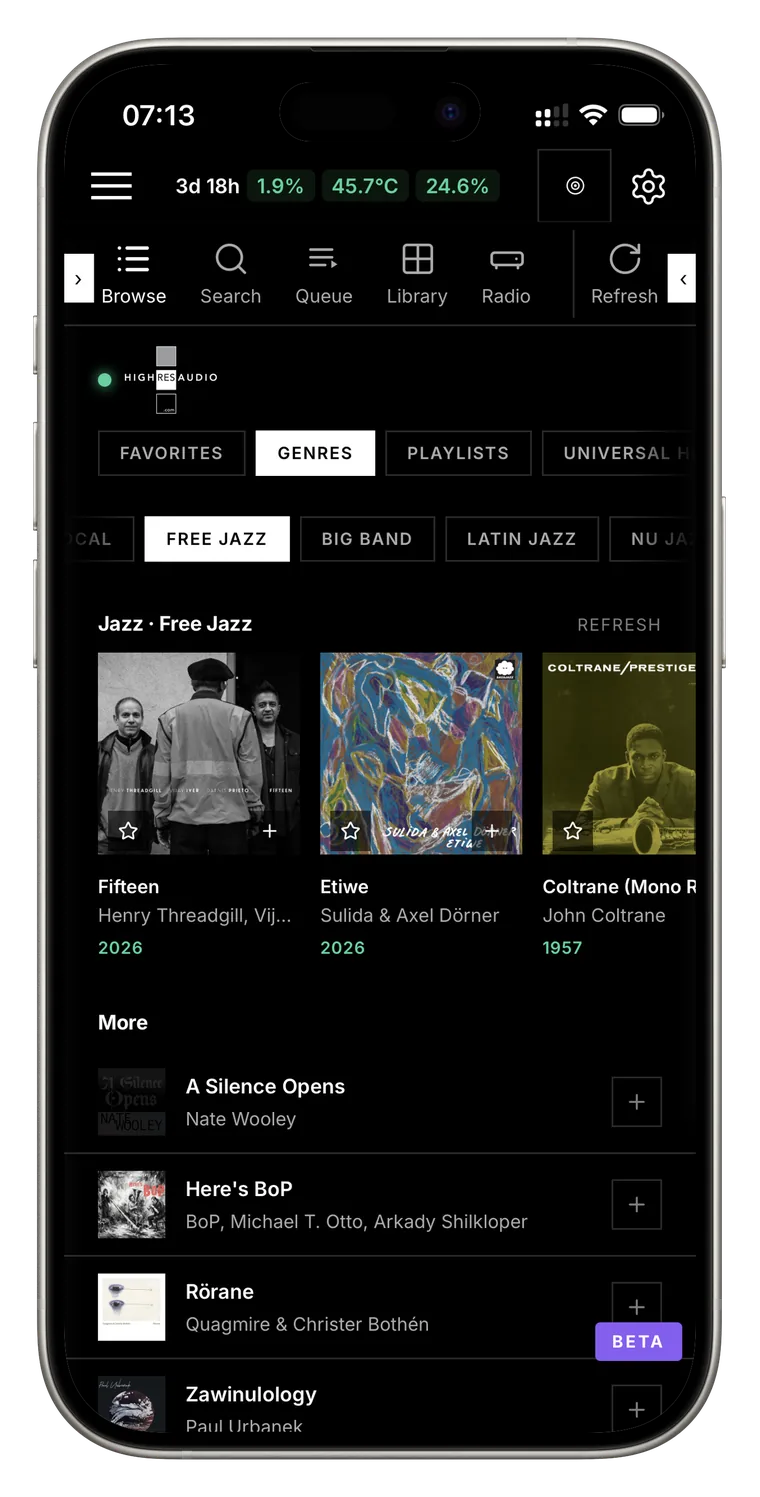
Browse Roon, MPD, MinimServer, Qobuz, Tidal and HIGHRESAUDIO from one interface — album view, full-text search, direct playback with cover art. Star an album to favourite it on its streaming service; tap an artist in search to open their albums across every source. Your Qobuz and HIGHRESAUDIO playlists are managed from here too: add the track playing or a whole album, open a playlist to play it from any track, rename it or tidy it up. Pick a track, pick a renderer: the music flows at full resolution — even local NAS/USB files cast to a network renderer, bit-perfect. Qobuz, Tidal and HIGHRESAUDIO require an active subscription. Your own music on the box — browse, search, queue, cast to a renderer — comes with the free Starter Edition.

Roon · MPD · UPnP/DLNA · Qobuz · Tidal · HIGHRESAUDIO · favorites ★ · your Qobuz & HIGHRESAUDIO playlists · local cast · UPnP renderers
STARTER

Internet radio without a parallel signal path

Most apps treat radio as a second-class source — a different player, a degraded path to the DAC, no metadata, no cover art. Here it isn't. Stations flow through the same transport as your FLAC library, route to the same output zone, surface the same Hi-Fi readout. Curate your own collection, filter the catalogue down to Hi-Res, save the ones worth coming back to. With HQPlayer as your output, with Pro, they can go through its filters too — stations broadcasting in AAC included, converted to FLAC as they arrive.

Same transport · Hi-Res filter · live metadata · cover art
PRO

HQPlayer — on the box, or on your network

Run HQPlayer Embedded on the box itself: install it from the Audio Software page — its licence is shown first, and nothing installs until you accept it — choose its output as you would any player's, and open its own settings page in one tap. Or control the HQPlayer you already run on your network, auto-discovered and connected in one tap. Either way, change its sound-shaping settings — interpolation filter, noise shaper, output mode and volume — without leaving the couch, and send anything you can browse — your own library, a media server, internet radio, Qobuz, Tidal and HIGHRESAUDIO — through its filters and upsampling, bit-perfect. Run more than one? Each keeps the filter, shaper and mode you chose for it. What HQPlayer cannot read — an ALAC library, a station broadcasting in AAC — is converted to FLAC on the way, losslessly; DSD is never converted. Move around inside a track from your phone, and the display follows the album, track by track. Audiogravity also recognises which HQPlayer it is connected to, and which version, and keeps the NAA on your box on the matching line.

HQPlayer Embedded on the box · Filter · Shaper · Mode · Volume · Auto-discovery · ALAC & AAC converted · NAA kept in step · Any source through HQPlayer
STARTER

One-tap profile scenarios

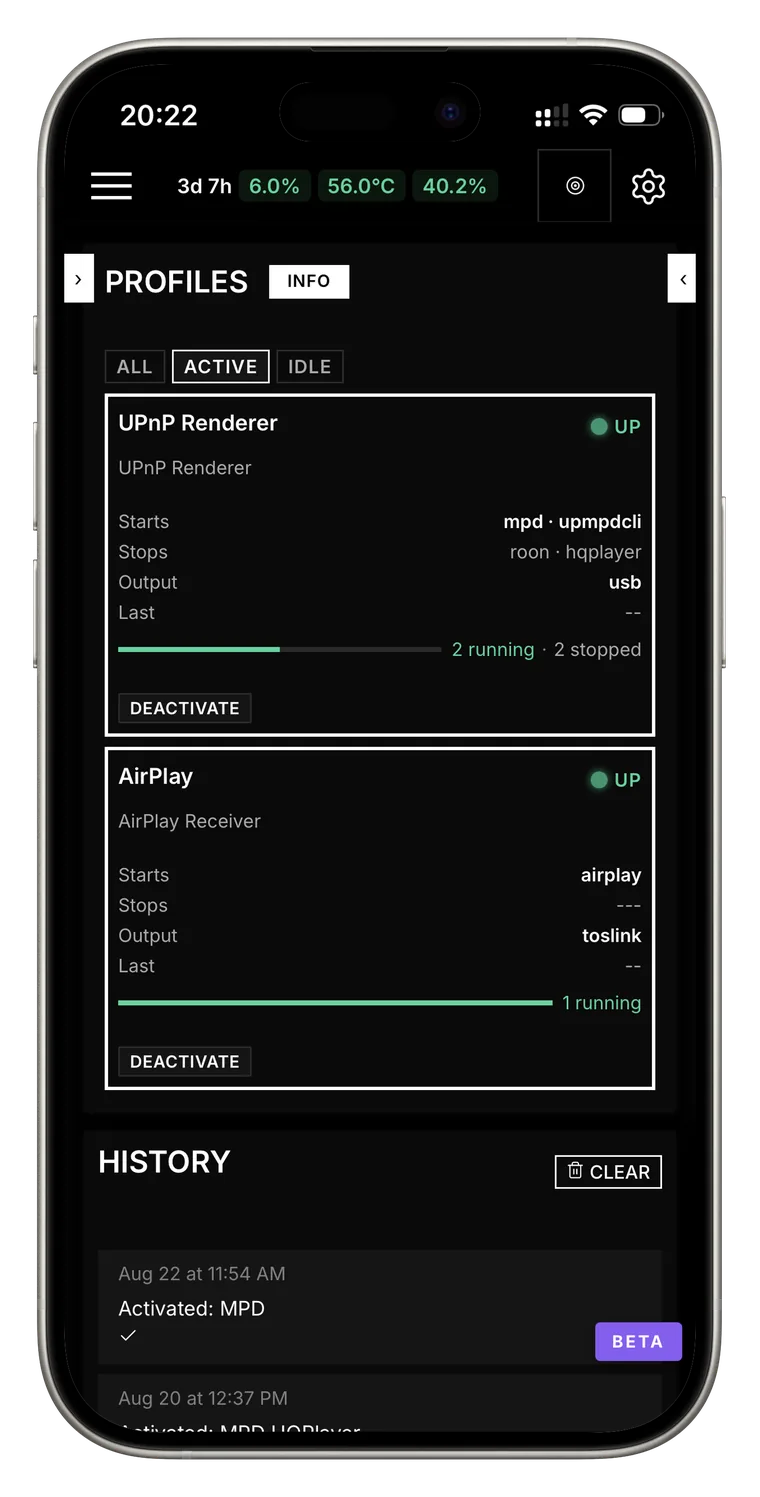
"Roon + HQPlayer" for serious listening. "MPD + upmpdcli" to expose your streamer as a UPnP renderer — controllable from any UPnP control point: JPLAY, BubbleUPnP, mconnect. OpenHome apps such as Kazoo work too — one switch in the UPnP bridge's configuration form. "AirPlay only" for background music. Each profile lists exactly which services to start and stop — conflicts resolved automatically, and a live health bar shows the whole chain is up.

Conflict resolution · live health · history
STARTER

UPnP Control Point — play to any renderer

Audiogravity becomes your UPnP control point: discover every renderer on your network — network amplifiers, dedicated streamers, DLNA speakers — and drive them directly from the interface. Pick your music, hit Play: the stream reaches the renderer bit-perfect, at full resolution, without touching the server's audio path. A live "Up next" strip shows the next track as it is loaded onto the renderer.

UPnP renderers · DLNA · bit-perfect · output selector · Up next
STARTER

Push notifications

Get notified the instant an audio service fails, the CPU crosses the critical temperature, the disk is almost full, a Raspberry Pi's power supply runs too weak, a new version of Audiogravity or of your audio software is available, or a profile is activated from another device. Even when the PWA is closed.

Service down · Critical temperature · Disk almost full · Weak power supply · Update available · Background push
PRO

Give your music its own CPU cores

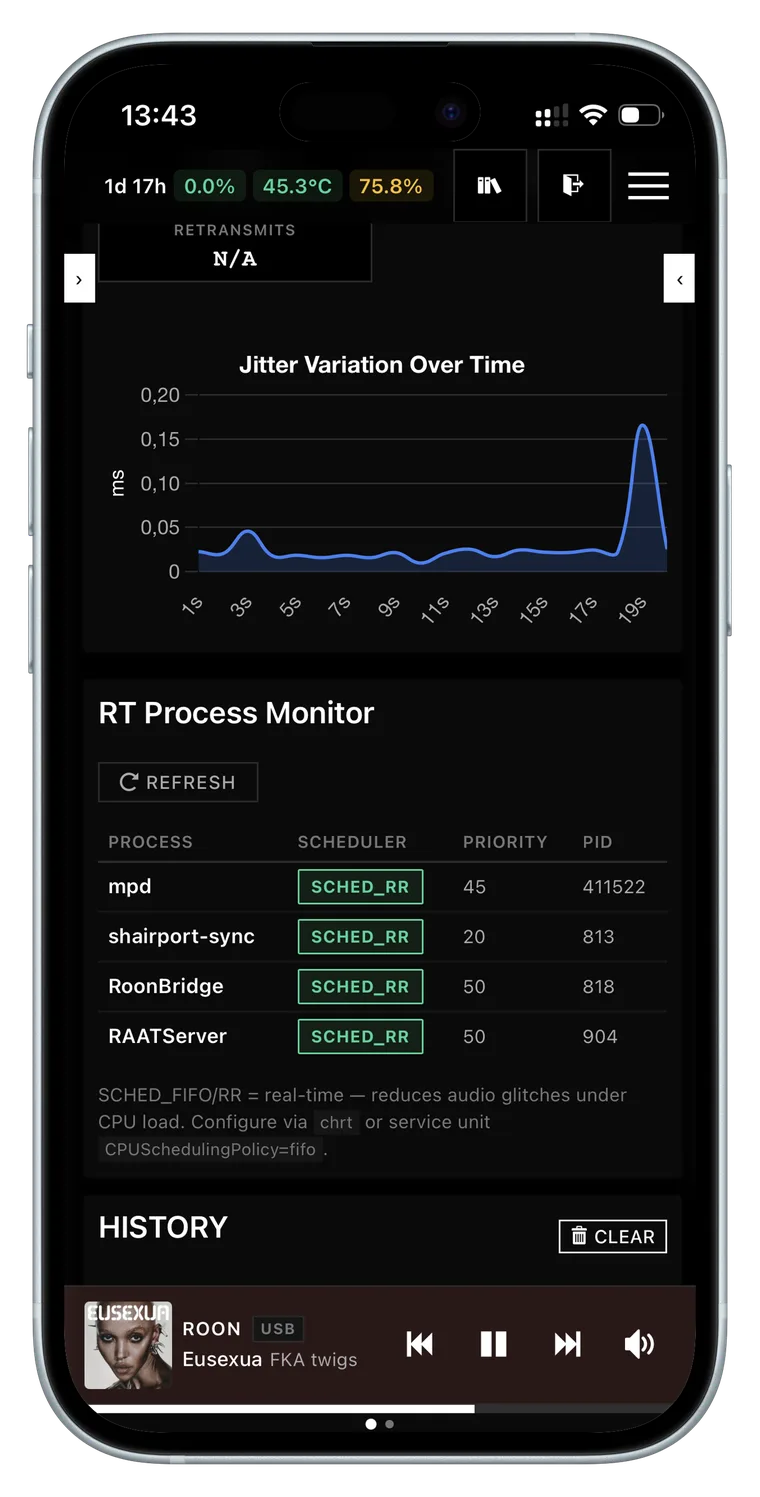
Your player gets the processor before anything else, on the cores you choose for it, with its audio held in memory — never pushed to disk mid-track. Written as system overrides that survive updates and can be undone at any time.

FIFO · RR · MEMLOCK · RTPRIO
PRO

Measure the stability, don't assume it

Run the test from your browser and read the result in microseconds: proof that the machine really holds a steady beat, not just that the software is installed. Compare before and after, each run timestamped and kept.

cyclictest · iPerf3 · jitter histograms
PRO

Full speed where it plays, quiet elsewhere

The cores playing music run flat out; the others stay quiet and cool. A per-core heat map shows where the warmth is, and a THROTTLED badge appears the moment the machine slows itself down to cope — before your ear catches it.

governor · Performance · Powersave · thermal map
STARTER

Set up and edit audio service configs without breaking them

New box? The guided setup detects your DAC and music library and generates a minimal config for MPD, AirPlay and UPnP, bit-perfect for MPD at full volume; Guided mode then changes an output or library in two clicks — only what you touch is rewritten. For deeper edits: form view, a full text editor with syntax highlighting (JSON, INI, XML, libconfig), a side-by-side diff to review every change, and an automatic backup before each save, restored in one click.

guided setup · mpd.conf · AirPlay · upmpdcli · live diff
PRO

Live signal-path visualisation

An interactive graph of your entire Hi-Fi chain — every source, every active audio process, down to the DAC. Each link shows the exact stream format (PCM / DSD · 44.1 kHz → 768 kHz · 16 → 32 bit), a full-resolution badge, per-link latency and live play state. Click a link to hot-reroute the audio to a different DAC — gapless on MPD; AirPlay warns you first, since its receiver has to restart.

interactive graph · pan · zoom · minimap · hot rerouting
STARTER

Service tile + live sparklines

Live systemd state. Instantaneous CPU, memory, network and disk with LOW/MEDIUM/HIGH thresholds. Uptime shown.

Live systemd · sparklines · uptime
STARTER

Complete audio device inventory

Every ALSA card, USB interface, subdevice and hardware capability your kernel sees — without aplay -l or lsusb. Plus CPU, temperature, memory, disk and network at a glance.

ALSA · USB · sub-devices · hardware caps
STARTER

WebAuthn passkeys

Face ID, Touch ID, fingerprint, YubiKey. Multiple devices per user, managed individually. Role-based access — Admin, User, Guest.

FIDO2 · Face ID · YubiKey · RBAC
STARTER

One-click self-update, with automatic rollback

When a new release ships, the Admin tab shows a banner: one click and your password — the box downloads, swaps and health-checks the new version, with live progress across the restart. If anything goes wrong it rolls back automatically to the previous version. Never left on a broken update, never a terminal.

Update banner · health-check · auto rollback · no terminal
PRO

Your listening, in figures

How long you listened over the past week, month or year, or since the very first track — your library, the streaming services, internet radio, AirPlay and your media servers alike. Which outputs it went to, how much was Hi-Res or DSD, the genres you came back to, your most played artists, albums and tracks, with their covers. It stays on the box, and you can switch it off or clear it at any time.

time listened · sources · outputs · Hi-Res share · genres · most played · stays on the box
Cover of Abbey Road by The Beatles
Now playing
Come Together
The Beatles — Abbey Road
Qobuz →HQPlayer →HQPlayer NAA →USB →Heed Abacus
See the full signal path
FormatDSD256
Sample11.3MHz
Bitrate22.6Mbps
CodecDSD
Output → DACHeed AbacusUSB

Every device.
Every connection. Live.

The pipeline graph is the signature view of Audiogravity. It renders your audio-topology.json — the physical and virtual map of your Hi-Fi chain — as a live, interactive SVG you can pan, zoom and steer from. Click any link to open the steering popover and reroute the ALSA output — gapless on MPD; AirPlay warns before restarting its receiver.

Audiogravity — your box Audiogravity — your box Qobuz · TidalHIGHRESAUDIOtheir servers Radio Browserstation catalogue MinimServer · NASyour UPnP server Roon Corevia Roon Bridge JPLAY · BubbleUPnPyour phone AudiogravityQobuz · Tidal · HIGHRESAUDIOinternet radio · libraryMPD · queue · transportHQPlayer Embeddedupmpdcli — UPnP rendererUPnP control point HQPlayerfilters · shapersPCM → DSD256 HQPlayer NAAendpoint, on the boxFIFO 80 · MEMLOCK DAC · USBHeed AbacusDSD256 · bit-perfect UPnP renderernetwork speaker Click any link → reroute the output: a different DAC, or any renderer on the network (gapless on MPD). Latency, RSSI and 802.11 protocol shown for every network hop.
Idle Active stream Full resolution

End the jitter.

A 200 µs interrupt is enough to make a DSD256 stream audibly grainy. Audiogravity gives each audio service the priority it needs, and writes those settings beside the originals rather than over them — an update cannot undo your work, and one click puts everything back. Then measure the result yourself, in microseconds.

What you control, per service

  • SchedulingAudio threads run ahead of everything else — strict or round-robin. (SCHED_FIFO / SCHED_RR)
  • PriorityWho gets the CPU first: your player, then AirPlay, then the rest. (1 → 99 — MPD at 80, AirPlay at 60)
  • Dedicated coresEach service runs on the CPU cores you choose for it. (affinity)
  • MemoryAudio stays in RAM — never pushed to disk mid-track. (MEMLOCK)
  • Internal threadsA ceiling so a single service cannot starve the others. (RTPRIO)
  • CPU speedFull speed on the cores playing music, low power on the idle ones — re-applied at boot. (governor)
# /etc/systemd/system/mpd.service.d/audio.conf
# written by Audiogravity · upgrade-safe drop-in
 
[Service]
CPUSchedulingPolicy=fifo
CPUSchedulingPriority=80
CPUAffinity=2 3
LimitMEMLOCK=infinity
LimitRTPRIO=95
Nice=-19
 
# verified by cyclictest
# max latency 47 µs · ✓ bit-perfect
2s

SSE telemetry, peak

Live CPU, temperature, I/O and network streamed to every connected browser. Backs off to 30 s at idle.

47µs

Cyclictest max latency

On a tuned Pi 5 with FIFO/80, CPU pinning and MEMLOCK — measured from the browser, archived with timestamp.

0

Cloud dependencies

Playback runs entirely on your local machine. No account. No telemetry. Your credentials and system state stay on your network — only cover-art and radio-catalogue lookups query public metadata services.

Five layers.
Audiogravity is two, drives three.

A streaming system is a stack. Audiogravity does not compete with audio engines like MPD, Roon Bridge or HQPlayer — it orchestrates them, installs and configures them, and tunes the OS underneath.

5
User Interface
Browser · phone · tablet · PWA
Audiogravity
4
Control / Orchestration
Source switching · transport · volume · UPnP renderer control · monitoring
Audiogravity
3
Content Sources
NAS · Qobuz · Tidal · HIGHRESAUDIO · Internet radio · MinimServer
Audiogravity manages
2
Audio Engine
MPD · Roon Bridge · HQPlayer Embedded · HQPlayer NAA · AirPlay · upmpdcli · UPnP renderers
Audiogravity manages
1
OS / Kernel
RT scheduling · CPU pinning · IRQs · ALSA
Audiogravity tunes

The takeaway: Audiogravity owns the interface and orchestration layers, installs, configures and drives the audio engines audiophiles already trust (MPD, upmpdcli, AirPlay, HQPlayer Embedded, the HQPlayer NAA + DSP, Roon, network UPnP renderers), connects the content sources they rely on (NAS, Qobuz, Tidal, HIGHRESAUDIO, internet radio, MinimServer), and tunes the OS kernel underneath — without replacing or hiding any of them.

A streamer is a board
and a software layer.

Network streamers sell for anywhere between a few hundred and several tens of thousands of euros. For the part that makes one a streamer — receiving, decoding, handing the result to a DAC — it is a board running Linux with a software layer on top. That layer is, most of the time, the one Audiogravity drives: ALSA, MPD, upmpdcli, Shairport-Sync.

One orchestrator.
Every audiophile engine.

Audiogravity is a streamer, and so are most of the columns below — the table shows where each one stops. What sets it apart is that it does not ask you to choose against Roon or HQPlayer: it installs Roon Bridge to be a Roon endpoint, and HQPlayer NAA to be an HQPlayer endpoint — or HQPlayer Embedded itself, running on the box — so both keep working inside it. JPLAY iOS is listed for what it is: a control point, not a streamer.

Capability Audiogravity Roon Volumio Moode HQPlayer JPLAY iOS
Product nature Streamer (orchestrates audio engines) Streamer + cloud platform Streamer Streamer Streamer (DSP focus) Controller only
Multi-engine orchestration (MPD + Roon + HQPlayer + AirPlay) partial partial partial — partial (HQPlayer)
Tidal, Qobuz & HIGHRESAUDIO in the library partial (Tidal, Qobuz) (Premium) partial (Qobuz, via upmpdcli) partial (Qobuz, HIGHRESAUDIO)
UPnP MediaServer browse & search (NAS via MinimServer, upmpdcli — results directly playable) — —
UPnP MediaRenderer control control point — — — —
UPnP MediaRenderer (controllable from JPLAY / BubbleUPnP…) via upmpdcli partial (RAAT) — —
Roon Bridge integration native — —
HQPlayer integration DSP remote + NAA as endpoint — — native
AirPlay receiver — —
System tuning for audio (FIFO, MEMLOCK, CPU affinity) — — — — —
Latency measured in microseconds (cyclictest, from the interface) — — — — —
Live signal-path visualization partial — — — —
Audio config editor (diff + automatic backup) — partial partial — —
DSD volume protection partial — — partial
Internet radio (Radio Browser + custom stations) —
PWA / web-installable — partial partial — —
WebAuthn / biometric login — — — — —
Self-hosted (no cloud account) account required partial (Premium needs an account)
Platform Linux server · iOS / Android PWA + browser UI Multi-OS (native apps) Linux server · browser UI + native apps Linux server · browser UI Windows · macOS · Linux iOS · Apple-silicon Macs
Pricing model Free (Starter) / €49 lifetime (Pro) $14.99 / month or $829.99 lifetime Free / Premium €7.49 / month or €69.99 / year Free €319 (version 6) $49.99 / year or $199 lifetime

supported · partial = limited · — not available. Comparison based on public information from each vendor's documentation, checked on 17 October 2026.

An app on your phone.
Without an app store.

Audiogravity isn't just a web interface — it's a Progressive Web App, installable from Safari or Chrome to your home screen. Full-screen, dedicated icon, biometric login, push notifications when a service falls over.

Install in one gesture. Unlock with your face.

From Safari (iOS) or Chrome (Android), add Audiogravity to your home screen. The app opens full-screen, without browser chrome, with its own icon. After a first password login, register a passkey on the device — every subsequent login is Face ID, Touch ID, fingerprint or YubiKey. Set up over a secure connection, the box now proves who it is. One approval per device — phone, tablet or computer — and the warnings stop for good: your browser treats it like any trusted site, which is what lets the app claim its own icon and open full-screen.

ScanThe installer ends with a QR code of your box's address — nothing to type on a phone
InstallSafari / Chrome → Add to Home Screen → full-screen PWA
LoginFace ID, Touch ID, Android fingerprint, Windows Hello, YubiKey
Multi-deviceSeveral passkeys per user, managed one-by-one in your profile
PushNotification when a service fails, the CPU hits the critical temperature, the disk is almost full, the power supply runs too weak, an update is available or a profile is activated from another device — even with the app closed
Touch targetsWCAG 2.1 AA · 44 px minimum · responsive layout
Audiogravity — Passkey login

Two editions.
Lifetime license.

Audiogravity comes in two editions: the Starter Edition, free, and the Pro License, a lifetime license that permanently unlocks every feature on one machine. Every install starts with thirty days of Pro, so you can try it all before you choose.

The interface is open source (MIT) — fork it, contribute, or build on it. The core engine remains proprietary.

Trial · included
30 days of Pro, on every install

Full access to every feature from the first start. No action required: the days remaining are shown in Admin › License, and after thirty days the box moves to the Starter Edition on its own.

Start trial
Starter Edition
€0
Free · forever · unlimited

Activates automatically when the trial expires — no action required. Everything you need to run your audio system and play the music on it. Includes all v1.x updates.

Library & radio — the music on the box · internet radio
Player — full screen · sleep timer · DAC or network speaker
Profiles — one-click chain switching
Services — live monitoring · start / stop / restart
Software — install · update · simulate
System — hardware dashboard + audio inventory
Users — Admin / User / Guest roles
Audio Services Config — safe in-place editing + diff
Guided provisioning — set the audio stack up in a few clicks
·Pro features locked
Get started
Platform
Debian 13 (Trixie) or later — DietPi and Raspberry Pi OS included, in their Trixie release — on x86_64 and Raspberry Pi (aarch64). The core installer turns any other system down. License is bound to the device — moving to another one requires a license reset, available on request.
Who I am
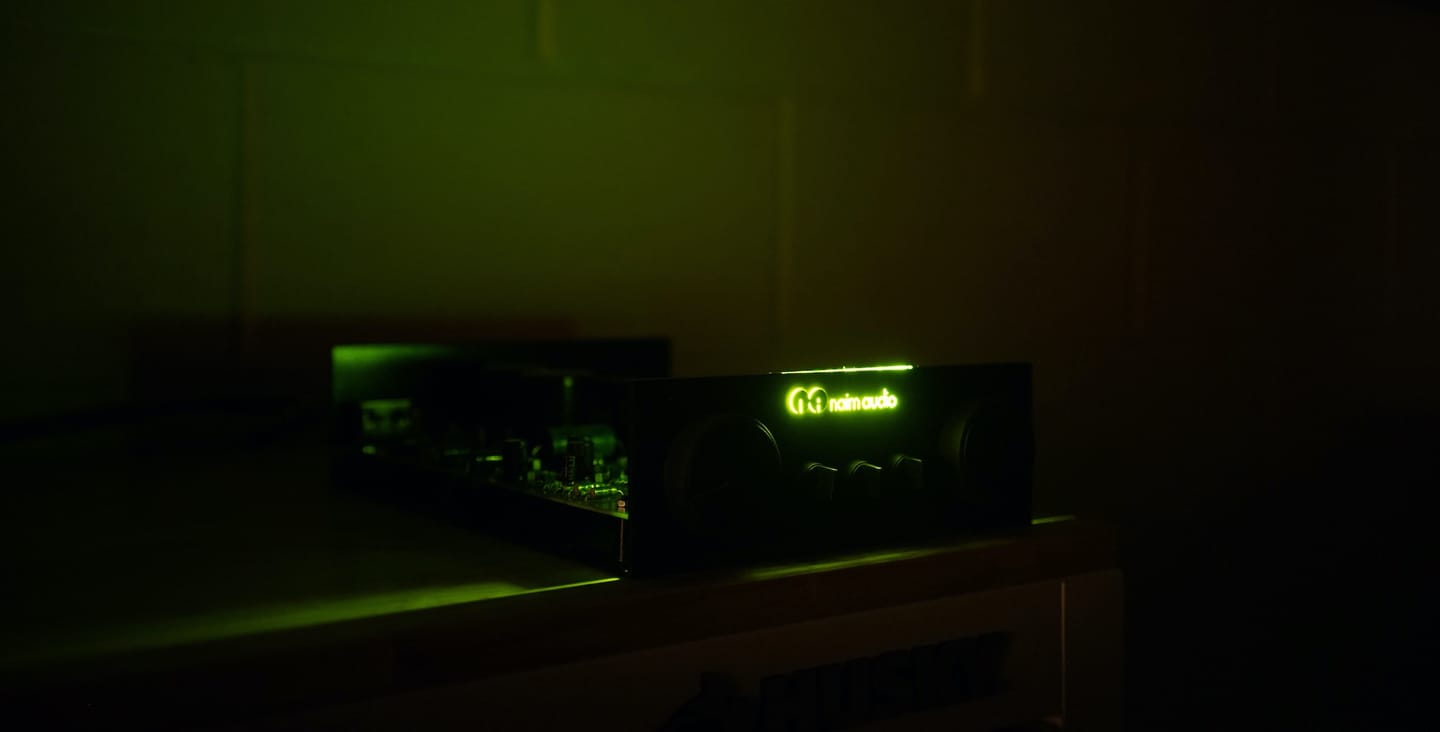
I designed Audiogravity for my own system — MPD, Roon, and HQPlayer connected to a Heed Abacus, a Naim NAC 52 / NAP 250 setup, and ATC SL20 speakers. I develop and maintain it myself, from France. — Alexandre Di Marco
The author's system in the dark, its Naim logo lit green
01 Pay with PayPal Buy now above, or Admin › License in the app. €49 lifetime.
02 Receive your key License key delivered by email within seconds. Order code unique to you.
03 Activate device Click "License Key", enter the key, confirm. The signed .lic file is bound to your device.
04 Listen All features immediately available. No restart, no logout. No subscription.

Common questions.

That the V1 scope is complete: every feature described exists and runs today — nothing here is a mock-up or a roadmap item. What remains is correction, refinement and optimisation, not missing features. Bugs do turn up, and they get fixed — report anything you hit.
The Starter Edition activates automatically — no action required. You keep full access to all Starter features indefinitely, for free. Pro features are locked until you purchase a licence (see 7. Administration → Licence). Streaming tracks left in your queue no longer play, and the queue shows them with a padlock; the music on the box plays on. The table in 1. Introduction → Editions lists what each edition includes.
Yes. MPD alone is enough for the Starter Edition. Roon, HQPlayer, upmpdcli, Shairport-Sync and AirPlay are all optional — install whichever you want in one click from the Audio Software tab, and Audiogravity manages them from there (configuration, tuning, orchestration). Using them from Audiogravity — Roon as a source, HQPlayer as the output, and their settings — comes with Pro, and so does the tuning. See 3. First run.
Only if you want to use those services, and everything else works without any third-party subscription.

To listen to them in full, yes: each needs its own active subscription, and the streaming services come with Pro. Browsing is another matter — Qobuz and Tidal let a lapsed account sign in and browse the whole catalogue, and play thirty seconds of each track; HIGHRESAUDIO refuses the catalogue but still plays what you bought from it. The sources card names the state in each case, so short tracks are never a mystery. See 5. Library & streaming.
Audio playback runs entirely on your local network — no cloud, no telemetry. Your licence keeps working offline too: whether Pro is unlocked is decided on the box, from the signature of your licence file, so a box that never reaches the internet again keeps every feature it had. What does need the internet: activating a licence in the first place, the daily check-in that carries announcements and update offers, and streaming from Qobuz, Tidal or HIGHRESAUDIO.
No. A Pro licence is bound to one installation. If you move to a new machine, a licence reset is available on request — contact us at [email protected].
Yes, on every edition: the trial, Starter and Pro all receive the updates of their major version (v1.x). Pro holders receive a preferential upgrade price for future major versions.
Audiogravity is a Progressive Web App — it installs from the browser, no app store needed. On iOS: open Safari, navigate to your Audiogravity URL, tap Share → Add to Home Screen. On Android: open Chrome, tap the three-dot menu → Install app. Either way, trust the box's certificate on the phone first (3. First run → 7). It then runs fullscreen with its own icon, just like a native app — and on iOS (16.4 or later) the installed app is what receives push notifications. See 3. First run.
With Pro, all three connect from Library → Sources: open the service's card and tap Connect. Qobuz signs in and redirects back automatically. Tidal lands on a fixed URL that a web app can't intercept — copy that full URL from the address bar, paste it back into the Tidal card and tap Finish login, once. HIGHRESAUDIO is simpler: enter your account email and password directly in its card. Tokens are then stored and refreshed for you. The full walkthroughs are in 5. Library & streaming.
A fully illustrated manual covers the whole journey — from installation to troubleshooting — with a one-page quick start and a glossary. It is readable inside the app (the Manual tab — the manual of the version your box runs, even without internet access) and online, where the latest edition is published.
From the interface. When a new release is available, the Admin tab shows an update banner — one click and your admin password, and the box downloads, installs and health-checks the new version with live progress. If anything goes wrong it automatically rolls back to the previous version. No terminal, no re-running the installer. See 8. Updating.

What comes next.
Nothing is settled yet.

The V1 scope is complete, and none of what follows belongs to it. These are some of the directions on the table — the list is not closed, none of them is promised, and the order is not fixed. What owners ask for is what decides it.

If one of these matters more to you than the others, say so — open an issue or write to [email protected].

One command,
and it is a streamer.

No compilation, no dependency hell, no manual configuration. The installer detects your architecture, generates security keys, configures the systemd service and starts everything. Then install your audio engines in one click from the interface (MPD, AirPlay, UPnP…) and let the guided setup wire your DAC and music library. A few minutes from curl to listening.

  • RecommendedDietPi (Trixie) on x86_64 or Raspberry Pi (aarch64)
  • SupportedDebian 13 (Trixie) or later — DietPi and Raspberry Pi OS in their Trixie release
  • AccessAny browser on your network — phone, tablet, laptop
  • NetworkLocal only. Your data never leaves your home.
  • Trial30 days full access · auto-activated on first run
  • UpdatesOne-click from the UI — no terminal, no re-running the installer
DietPi
Recommended
Raspberry Pi
aarch64
Debian 13+
x86_64
# All-in-one — core + ui, works on your LAN curl -fsSL https://audiogravity.app/install.sh | sudo bash # Then open the address it prints — your streamer by name: https://<your-streamer>.local # Trust its certificate once on each phone (it prints how): # app icon, Face ID and notifications follow. # Behind your own HTTPS reverse proxy? Plain HTTP: curl -fsSL https://audiogravity.app/install.sh | sudo bash -s -- --http
# Optional — your own domain: Face ID from any network, # and no certificate to trust on each phone: curl -fsSL https://audiogravity.app/install.sh \ | sudo bash -s -- \ --public-url https://your-domain